
How to Learn AI in 2026: A Practical Roadmap for Beginners, VAs, Freelancers, and Business Owners
Most people learning AI in 2026 are not doing more. They are doing things in the right order.
That is the difference between feeling stuck and actually building something useful.
Right now, AI can feel like a never-ending race. Every week, there is a new tool, a new update, a new course, a new workflow, a new "must-use" platform, and a new expert telling you that you are already behind.
One person is talking about ChatGPT. Another is comparing Claude and Perplexity. Someone else is using Gamma for presentations, NotebookLM for research, Ideogram for visuals, OpusClip for videos, Julius AI for data, or Windsurf for coding.
It can feel like the whole world suddenly moved into a new version of work, and you are still trying to understand where to begin.
But here is the truth:
Learning AI in 2026 is not about learning everything. It is about learning the right things in the right order.
You do not need to master every AI tool. You do not need to become a developer. You do not need to memorize technical terms or follow every trend. What you need is a simple learning path that helps you understand what is changing, how AI works at a practical level, and how to use it inside real workflows.
Because the real shift is not just tools. The real shift is how work is being done.
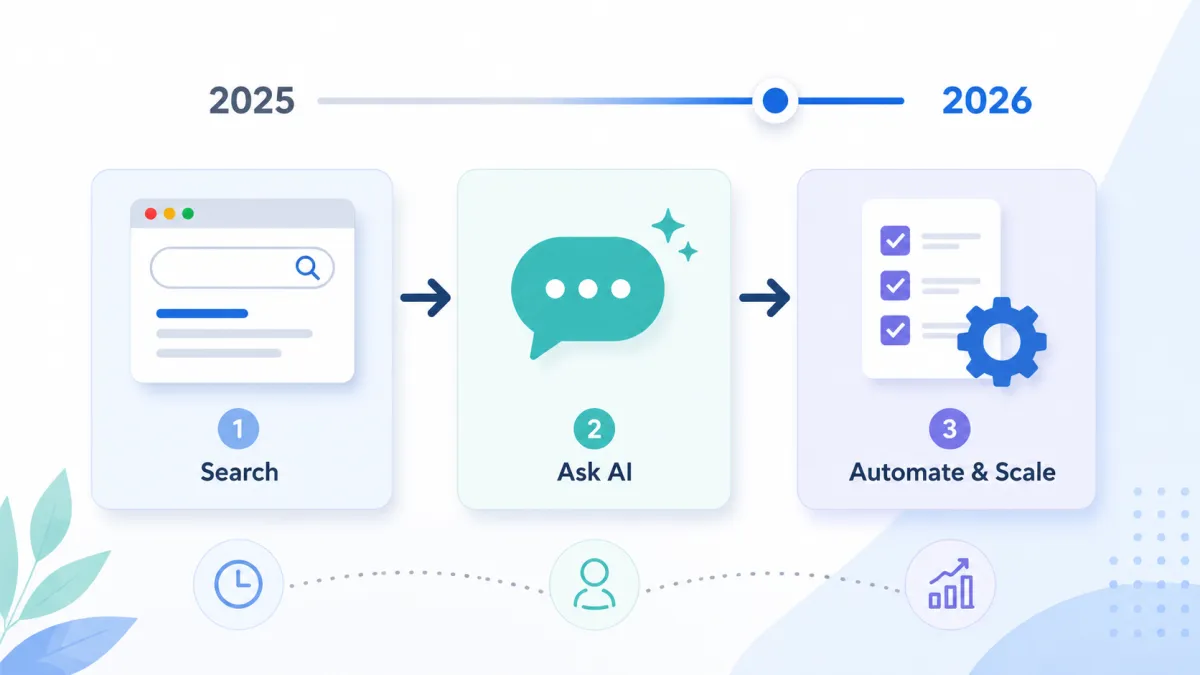
In 2025, many people still treated AI like a smarter search engine or a writing assistant. They would ask for captions, blog ideas, email drafts, or quick summaries. That was useful, but it was only the beginning.
In 2026, AI is becoming part of the actual operating system of work. People are using AI to research, analyze, summarize, plan, draft, automate, build, organize, and improve decision-making. It is no longer just "ask AI a question." It is "use AI to support a workflow." That is the skill to learn.
Not just which tool is trending. Not just which course to take. Not just which prompt formula to memorize.
The more important question is: How do I use AI to think better, work faster, and build more useful systems?
That is where the real advantage is.
This roadmap will help you learn AI in a practical way, especially if you are a virtual assistant, freelancer, founder, agency owner, marketer, student, content creator, or operations person trying to stay relevant in the changing world of work.
1. Understand What Is Actually Changing
Before you learn tools, you need to understand the shift.
The biggest mistake people make when learning AI is starting with tools first. They jump from one platform to another without understanding what problem each tool solves. They try ChatGPT for writing, Perplexity for research, Claude for long-form thinking, Gamma for presentations, and then suddenly they feel more confused than before.
The problem is not the tools. The problem is the lack of structure.
AI is changing work in several major ways, and understanding each one matters before you touch a single tool.
We are moving from searching to asking better questions. Before, you would open Google, type a keyword, click different websites, scan several tabs, and piece together your answer. Now, AI tools can help you ask more specific questions and receive structured answers faster. This does not remove the need for fact-checking, but it changes the way research begins. The person who knows how to ask a precise, context-rich question will consistently get better results than the person who types three vague words into a search bar.
We are moving from clicking to automating. Many repetitive tasks that used to require manual clicking can now be supported by AI and automation tools. This includes summarizing leads, organizing inboxes, drafting replies, generating reports, tagging data, creating content outlines, and moving information between apps. For growing businesses that rely on operational support to keep things running, this shift is especially significant. Tasks that used to take a full-time person several hours a day can now be structured into AI-assisted workflows that run faster and with fewer errors.
We are moving from doing everything manually to delegating parts of the workflow. This is one of the biggest mindset shifts. AI is not just a tool you use after you already know what to do. It can help you think through options, organize messy information, generate first drafts, compare strategies, and create task lists. This is also why the relationship between virtual assistants and AI is so important right now. The VAs who understand this shift are becoming more valuable, not less.
We are moving from blank-page work to assisted creation. Before, writing a blog post, proposal, sales page, SOP, or presentation often started from a blank page. Now, AI can help produce the first structure. The human still needs to edit, refine, verify, and add judgment, but starting from zero is no longer required. This applies to everything from writing client emails to building entire content calendars.
This is why AI feels overwhelming if you do not understand the bigger shift. You are not just learning tools. You are learning a new way of working.
Once you understand that, the tools become easier to evaluate. Instead of asking, "What AI tool should I learn next?" ask these questions:
What work do I repeat every week?
What tasks take too much time?
What do I need to research often?
What do I create regularly?
What can be turned into a repeatable workflow?
What needs human judgment, and what can AI help draft or organize?
This is where AI becomes useful. Not random. Not overwhelming. Not just another app to open. Useful.
2. Learn How AI Works at a High Level
You do not need to become a machine learning engineer to use AI well. But you should understand the basics.
A lot of confusion around AI comes from unrealistic expectations. Some people expect AI to magically know what they mean. Others assume that if AI gives an answer confidently, it must be correct. Both are risky assumptions, and they lead to wasted time, bad output, and frustration.
To use AI properly, you need to understand a few high-level concepts.
Large language models (LLMs) are AI systems trained on large amounts of text. They generate responses by predicting language patterns based on the input you give them. They are powerful for writing, summarizing, reasoning, organizing, explaining, and drafting. But they are not humans. They do not "know" things the way people know things. They generate responses based on patterns, context, and probabilities. This is why they can sound confident even when they are wrong. The MIT Technology Review regularly publishes research on how LLMs work and where their limitations appear, and it is worth reading even a few of those articles to build your understanding.
Context is everything. AI output depends heavily on what you provide. If you give a vague prompt, you usually get a generic answer. If you give a clear task, background information, audience, tone, constraints, and format, the output improves dramatically.
For example, this prompt is weak: "Write about AI."
This prompt is stronger: "Write a beginner-friendly blog introduction about how virtual assistants can use AI to save time on research, content drafting, SOP creation, and client communication. Use a practical tone. Avoid hype. Keep it clear and useful."
The second prompt gives the AI a job to do. It tells the model who the audience is, what the content should cover, and what tone to use. That is the difference between getting a generic paragraph and getting something you can actually use.
AI needs review. AI can help you move faster, but it should not replace human judgment. You still need to check facts, refine tone, remove generic wording, verify claims, and make sure the output matches the actual business context. This is especially important for client work.
AI can draft. AI can summarize. AI can organize. AI can suggest. But the human is still responsible for quality.
This is the standard that matters in 2026: AI creates speed. Human review creates trust.
If you understand that, you will use AI more responsibly and more effectively. And this is exactly why businesses that combine AI-assisted workflows with skilled human professionals are outperforming those that try to do one or the other.
3. Use Modern AI Tools With Purpose
One of the fastest ways to get overwhelmed is to try every AI tool you see online. That is not learning. That is collecting.
You do not need a folder full of tools you barely use. You need a working stack. A working stack means a small group of tools that support the actual work you do.
For virtual assistants, you may need tools for research, writing, email support, SOP creation, calendar support, content repurposing, project management, and client reporting. The AI-proof skills that matter most for VAs are about knowing when and how to use these tools together, not just knowing that they exist.
For founders, you may need tools for strategy, decision support, hiring workflows, sales copy, customer research, operations documentation, and automation planning.
For marketers, you may need tools for content ideation, keyword research, campaign planning, audience analysis, competitor research, social media repurposing, and reporting.
For students, you may need tools for study notes, research summaries, concept explanations, flashcards, project outlines, and writing support.
The tool depends on the work. Do not choose tools based only on popularity. Choose them based on purpose.
A simple AI stack might include:
One general AI assistant for thinking, drafting, and organizing (such as ChatGPT, Claude, or Gemini)
One research tool for faster discovery and source review (such as Perplexity or NotebookLM)
One document or note tool for summarizing and analyzing materials
One automation tool, if your work involves repeated processes (such as Make or Zapier)
You can always expand later. But start with a small stack you can actually use consistently.
The goal is not to say, "I know 20 AI tools." The goal is to say, "I know how to use AI to make my work better." There is a big difference.
4. Learn Prompting as a Practical Work Skill
Prompting is not about sounding technical. Prompting is about giving clear instructions.
A good prompt tells AI what to do, why it matters, and how the output should look. This matters because AI works better when the task is specific.
A strong prompt usually includes the role or perspective, the task, the context, the audience, the format, the tone, the constraints, and the goal.
For example: "Act as an operations strategist. Create a client onboarding checklist for a digital agency that just signed a new SEO client. Include access collection, project setup, baseline audit, reporting requirements, task ownership, and kickoff preparation. Format it as a checklist with clear sections."
This prompt is strong because it gives the AI structure.
Here is another example: "Create a LinkedIn post for aspiring virtual assistants explaining why proof of skill matters before pitching clients. Use a direct but encouraging tone. Keep it under 200 words. Avoid sounding motivational without substance."
Prompting is not magic. It is structured communication.
This is why learning AI can also make you better at delegation. When you learn how to prompt clearly, you learn how to explain tasks clearly. That skill applies to working with assistants, freelancers, employees, contractors, and clients.
Bad prompts often sound like unclear delegation: "Can you do this?"
Good prompts sound like effective delegation: "Here is the task, here is the context, here is the expected output, here is the deadline, here are the constraints, and here is what success looks like."
This is also directly related to how teams work inside managed VA solutions. When instructions are clear and structured, the quality of execution goes up for humans and AI alike.
That is why prompting is becoming a core work skill. It trains you to think before you assign.
5. Focus on Real Use Cases Instead of Random Experiments
Trying AI without a real use case is one reason people give up. They open a tool, ask a few random questions, get generic answers, and think, "This is not that useful."
But AI becomes valuable when you apply it to real work. Do not just ask AI what it can do. Give it something useful to do.
For example, use AI to:
Turn meeting notes into action items
Convert a messy process into an SOP
Create a blog outline from scattered ideas
Draft a client email response
Summarize a long PDF
Compare software options
Create a project checklist
Analyze customer feedback
Generate social media angles
Repurpose a webinar into posts
Build a weekly reporting template
Draft FAQs for a service page
Organize research into a decision brief
This is how learning sticks. You remember better when AI helps you solve a real problem.
For virtual assistants and freelancers, this is especially important. Clients do not care if you "know AI" in a general sense. They care if you can use AI to produce better work, faster turnaround, clearer communication, and more organized execution. This is part of why businesses are rethinking what they look for when hiring a virtual assistant. The bar has moved.
For business owners, the same applies. AI is not valuable because it is trendy. It is valuable when it reduces bottlenecks, improves clarity, speeds up delivery, or supports better decisions.
A practical AI learning question is: "What is one task I do repeatedly that AI can help me improve?"
Start there. Not with 50 tools. Not with 100 saved posts. One task. One workflow. One improvement.
6. Build Small AI Projects
This is where most people skip the actual learning. They consume tutorials. They watch demos. They save courses. They bookmark tool lists. But they do not build anything.
Small projects are where the learning happens. You do not need to build a complicated AI app. You can start with simple projects that solve small problems.
For example, you can build:
A content idea generator
A weekly reporting assistant
A research summary template
A client onboarding checklist generator
A blog outline assistant
A customer FAQ builder
A task prioritization assistant
A meeting notes organizer
A social media repurposing workflow
A proposal draft assistant
A basic SOP builder
These projects teach you how to think in workflows.
Take a content generator as an example. A weak version is asking AI: "Give me content ideas." A better version is creating a repeatable content workflow:
Define the target audience.
Identify their common problems.
Generate content angles.
Choose one angle.
Create a post outline.
Draft the caption.
Rewrite it in your tone.
Create a visual concept.
Create a CTA.
Save the process as a reusable prompt.
That is a small AI-powered workflow, and it takes you from someone who "uses AI" to someone who builds with AI.
The same approach works for operations. Instead of asking "Write an SOP," you can build an SOP workflow: describe the process, identify the trigger, list the tools needed, break the process into steps, define the expected output, add quality checks, add escalation rules, and turn it into a clean SOP format.
This is where AI becomes more than a writing tool. It becomes part of how you structure work. And businesses that have adopted this approach to their backend operations, using AI-assisted delivery frameworks, are seeing measurable improvements in turnaround and consistency.
The best way to learn AI in 2026 is to build small systems around real tasks. Small projects create confidence. Confidence creates consistency. Consistency creates capability.
7. Build the Habit: Learn, Apply, Review, Repeat
You do not need to learn everything at once. You need a repeatable learning rhythm.
Use this simple loop: Learn. Apply. Review. Repeat.
Learn one concept. Apply it to one real task. Review the output. Improve the process. Then repeat.
This is much better than trying to master ten tools in one week.
For example, in week one, you can focus on better prompting. In week two, you can use AI for research. In week three, you can use AI to create SOPs. In week four, you can use AI to build a simple automation plan.
That is enough.
Consistency matters because AI changes quickly. The exact tools may evolve, but the underlying skills will still matter:
Asking better questions
Giving clear instructions
Structuring information
Reviewing outputs
Building workflows
Applying judgment
Creating repeatable systems
These skills are transferable. Even if the tools change, the way you think will still be useful.
That is why the best AI learners are not always the most technical. Often, they are the most structured. They know how to break down problems. They know how to define outcomes. They know how to review work. They know how to connect tools to actual business needs. That is the real advantage.
8. Learn AI Based on Your Role
Not everyone needs the same AI learning path. A virtual assistant does not need the exact same AI skills as a software developer. A founder does not need the same workflow as a data analyst. A marketer does not need the same stack as a cybersecurity professional.
Start with your role.
For Virtual Assistants
Focus on prompting, email drafting, research, SOP creation, calendar and inbox support, client reporting, content repurposing, task management, and quality assurance. AI can help VAs become faster and more strategic, but only if they maintain review standards. The new VA standard is not "AI does the work." It is AI-assisted execution with human judgment and quality control. If you want to understand what this looks like in practice, read about what a virtual assistant actually does in 2026.
For Freelancers
Focus on proposal creation, client communication, content creation, research, service packaging, workflow documentation, lead magnets, and portfolio building. AI can help freelancers present their work more clearly and reduce the time spent starting from scratch.
For Founders
Focus on decision support, hiring processes, delegation, SOPs, sales copy, market research, customer insights, and operations cleanup. AI can help founders get their thinking out of their heads and into systems their team can use. If you are scaling and finding it hard to keep up with the operational side, staffing solutions paired with AI-assisted workflows can take that pressure off.
For Marketers
Focus on content strategy, keyword research, competitor analysis, campaign planning, repurposing, audience research, reporting, and AI visibility. AI can help marketers move from content production to content systems.
For Students
Focus on study summaries, research organization, concept explanations, writing outlines, flashcards, and project planning. AI can help students learn faster, but it should not replace critical thinking.
The best AI learning path is the one connected to your actual responsibilities.
9. Recommended Courses to Support Your AI Learning in 2026
Courses can help, but they should support your learning path instead of replacing action. Do not take courses just to collect certificates. Take courses that help you build skills you can apply.
AI and Prompting
These are useful if you want to understand how generative AI works and how to communicate with AI tools more effectively.
Google AI Essentials (Coursera)
Google Prompting Essentials (Coursera)
Google Introduction to Generative AI (Coursera)
Essentials of Prompt Engineering (Coursera, by AWS)
Navigating Generative AI (Coursera)
Data and Analytics
These are useful if you want to work with reports, dashboards, business insights, or data-supported decision-making.
Data Analysis with R Programming (Coursera)
Microsoft Power BI Data Analyst (Coursera)
Generative AI for Data Analysts (Coursera)
Microsoft Azure Data Scientist Associate (Coursera)
The Structured Query Language (Coursera)
Project Management and Business Skills
These are helpful if you want to manage tasks, clients, teams, and workflows better.
Google Project Management (Coursera)
Leading Teams (Coursera)
Excel Skills for Business (Coursera)
Tech, Development, and Cybersecurity
These are useful if you want to move into technical support, software, cybersecurity, or data-related roles.
Google Cybersecurity (Coursera)
Google IT Support (Coursera)
Web Applications for Everybody (Coursera)
IBM Full Stack Software Developer (Coursera)
Microsoft Cybersecurity Analyst (Coursera)
Generative AI for Cybersecurity (Coursera)
Generative AI for Data Engineers (Coursera)
Generative AI for Data Scientists (Coursera)
Design and Digital Marketing
These are useful if you create digital assets, manage online campaigns, or support online businesses.
Google UX Design (Coursera)
Google Digital Marketing & E-commerce (Coursera)
Coursera Plus Full Course Library (10,000+ courses)
Note: Before publishing, verify that all course links are still active and that course names have not changed.
10. A Simple 30-Day AI Learning Plan
Here is a practical way to start.
Week 1: Understand the Basics
Focus on what AI is, what LLMs are, and how prompting works. Your goal is not mastery. Your goal is basic understanding. Practice by asking AI to explain concepts, summarize articles, and rewrite information for different audiences. If you want structured learning, start with Google AI Essentials, which can be completed in under 10 hours.
Week 2: Practice Prompting
Choose five tasks you already do. For each task, write a better prompt. Include the role, task, context, format, tone, and expected output. Then compare the results. This will teach you how much input quality affects output quality. If you want a framework, the Google Prompting Essentials course teaches a five-step prompting process.
Week 3: Apply AI to Real Work
Pick one real workflow. It can be content creation, inbox support, research, reporting, SOP creation, or client onboarding. Use AI to improve one part of that workflow. Do not automate everything yet. Start with one step. If you are a VA or work in operations, this is where you start building the kind of value that companies are looking for when they invest in AI-assisted operational support.
Week 4: Build a Small Project
Create one reusable AI-powered workflow. Examples: a weekly report generator, a blog outline workflow, a meeting-notes-to-action-items system, an SOP builder, a client onboarding checklist, or a content repurposing workflow.
Document the steps. Save your prompts. Review the output. Improve the process.
By the end of 30 days, you will not just "know about AI." You will have used it to build something practical. That is the difference.
Final Thought
Learning AI in 2026 is not about chasing every new platform. It is about learning how to think, ask, build, and work differently.
The people who will get ahead are not necessarily the people who know every tool. They are the people who know how to use AI inside real workflows.
They understand the shift. They know how to give clear instructions. They apply AI to actual problems. They review the output. They build small systems. They stay consistent.
That is the roadmap.
Start with the basics. Understand the shift from tools to workflows. Learn how AI works at a high level. Practice prompting. Use tools with purpose. Focus on real use cases. Build small projects. Then repeat.
AI is not just another tool to learn. It is becoming part of how modern work gets done.
The sooner you learn how to use it with clarity, structure, and judgment, the sooner you stop feeling behind and start building with confidence.
If you are a business owner looking to integrate AI into your operations without figuring it all out yourself, Steun Outsourcing combines skilled virtual professionals with AI-assisted workflows so you can scale without the learning curve. Book a free discovery call to see how it works.